Those of us who work with digital assets know that one day we’ll face format obsolescence. The formats we have in our care will no longer be rendered by the applications that created them or by readily obtainable alternatives. This applies to all formats not just JPEG2000. As a relatively new and untried format planning for the long term management of JPEG2000 will require some work.
The key challenge with migration as a strategy is not deciding how to do migration but how to identify and maintain the significant properties of the format being migrated. The danger is that some property of the format may be lost during the process. The biggest fear with images being that quality will deteriorate over time. This loss of quality, whilst insignificant in the initial migration, may have a detrimental cumulative and irreversible effect over time.
So, do we have a plan for the future migration of obsolete JPEG2000 files? No, we do not. We are still trying to develop the specifications for the types of JPEG2000 that we want to use. Beyond the pale or not we have accepted that our images will be lossy. What we are trying to do is create JPEG2000 images that are consistent, have a minimal range of compression ratios and have a few variations in technical specifications as we can provide for. As a start this will make long term management simpler, but we are aware that we still have a way to go.
Our promotion of JPEG2000 as a format will hopefully make it more widely accepted and therefore the format will attract more research into possible migration options. We’re pleased to see that already individuals and organisations have been thinking about future migration of JPEG2000. The development of tools such as Planets in recent years has been a great step forward in supporting decision making around the long term management of formats.
Obsolescence is not something totally beyond our control. We are free to decide when obsolescence actually occurs, when it becomes a problem we need to deal with, and, with proper long term management strategies how we plan to migrate from obsolete formats to current ones. The choice of JPEG2000 as a master format supports this broader approach to data management.
The long term management of JPEG2000 as a format is part of our overall strategy for the creation of a digital library. Ease of use, the ability to automate processes and the flexibility of JPEG2000 have all been factors in our decision to use the format.
We’re clear that the choice we have made in the specification of our JPEG2000 images is a pragmatic one. Its also clear that the decision to use JPEG2000 in a lossy format has consequences. However, we have a format that we can afford to store and one that offers flexibility in the way that we can deliver material to end users. For us this balance is important, probably more important than any single decision about one aspect of a formats long term management.

July 21, 2010

July 13, 2010
Lossy v. lossless compression in JPEG 2000
The arguments for and against using JPEG 2000 lossy files for long-term preservation are largely centred around two issues: 1) that the original capture image is the true representation of the physical item, and therefore all the information captured at digitisation should be preserved; and 2) that lossy compression (as opposed to lossless compression) will permanently discard some of this important information from the digital image. Both of these statements can be challenged, and the Buckley/Tanner report went some way to doing this.
The perceived fidelity of the original captured image is the root of the attachment to lossless image formats. As cameras have improved, so has the volume of information captured in the RAW files. This volume of information has of course improved the visual quality and accuracy of the images, but this comes at the cost of inflated file sizes. A high-end dSLR camera will produce RAW files of around 12Mb. A RAW file produced by a medium-format camera may be 50Mb or higher. When a RAW file is converted to a TIFF, file sizes can increase dramatically depending on the bit-depth chosen due to interpolating RGB values for each pixel captured in the RAW file. As RAW files can only be rendered (read) by the proprietary software of the camera manufacturer (which may include plugins for 3rd party applications like Photoshop), they cannot be used for access purposes and, being proprietary, are not a good preservation format. They must be converted to a format suited to long term management, and this has usually been TIFF. When a RAW file is converted to a TIFF, file sizes can increase dramatically depending on the bit-depth chosen due to interpolating RGB values for each pixel captured in the RAW file. This bloats the storage requirements by 2 to 4 times.
However, image capture and subsequent storage of large images, is expensive, and we don't want to have to redigitise objects ever if we can get away with it - particularly for large scale projects. So, how much of a compromise is lossy compression, and is it really worth it? The question is: what information are we actually capturing in our digital images? Do we we need all that information? Is any of it redundant?
First - the visual fidelity issue. Fidelity to what information? The visual appearance of a physical item as defined by one person in a particular light? The visual appearance as perceived through a specific type of lens? All the pixels and colour information contained in the image as captured under particular conditions? No two images taken through the same camera even seconds apart will look the same due to distortions caused by the equipment, and, possibly, noise levels. What makes any particular pixel the original representation, or the most accurate, or indeed at all important?
Lossy compression will permanently discard data. What is necessary is to determine - for any given object, set of objects, or purpose - what information is actually useful and necessary to retain. We already balance these decisions at the capture stage. Choosing to use a small-format camera immediately limits the amount of information that can be detected by the camera sensor. Choosing one lens over another introduces a slightly different distortion. Compression also represents a choice between what you can capture and what you actually need. One may not need all the information that has been captured; some of it may be redundant. A lot of it may be redundant. And the point of JPEG 2000 is that it is very good at removing redundant information.
At the Wellcome Library, the aim of our large-scale digitisation projects is to provide access. We do not want to redigitise in the future, but we do not see the digital manifestations as the "preservation" objects. The physical item is the preservation copy, whether that is a book, a unique oil painting, or a copy of a letter to Francis Crick. For us, the important information captured in a digital manifestation are the human-visible properties. Images should be clear and in-focus, details visible on the original should be visible in the image (so it must be large enough to see quite small details), colour should be as close to the original as possible in daylight conditions and consistent, and there should be no visible digital artefacts at 100%. This is the standard for an image as captured.
We are striking a balance. Can we compress this image and retain all these important qualities? Yes. Do we need to retain information that doesn't have any relevance to these qualities? No. Lossy compression works for us. Using these qualities as a basis, we set out a testing strategy to determine how much compression our images could withstand.
To be continued...
The perceived fidelity of the original captured image is the root of the attachment to lossless image formats. As cameras have improved, so has the volume of information captured in the RAW files. This volume of information has of course improved the visual quality and accuracy of the images, but this comes at the cost of inflated file sizes. A high-end dSLR camera will produce RAW files of around 12Mb. A RAW file produced by a medium-format camera may be 50Mb or higher. When a RAW file is converted to a TIFF, file sizes can increase dramatically depending on the bit-depth chosen due to interpolating RGB values for each pixel captured in the RAW file. As RAW files can only be rendered (read) by the proprietary software of the camera manufacturer (which may include plugins for 3rd party applications like Photoshop), they cannot be used for access purposes and, being proprietary, are not a good preservation format. They must be converted to a format suited to long term management, and this has usually been TIFF. When a RAW file is converted to a TIFF, file sizes can increase dramatically depending on the bit-depth chosen due to interpolating RGB values for each pixel captured in the RAW file. This bloats the storage requirements by 2 to 4 times.
However, image capture and subsequent storage of large images, is expensive, and we don't want to have to redigitise objects ever if we can get away with it - particularly for large scale projects. So, how much of a compromise is lossy compression, and is it really worth it? The question is: what information are we actually capturing in our digital images? Do we we need all that information? Is any of it redundant?
First - the visual fidelity issue. Fidelity to what information? The visual appearance of a physical item as defined by one person in a particular light? The visual appearance as perceived through a specific type of lens? All the pixels and colour information contained in the image as captured under particular conditions? No two images taken through the same camera even seconds apart will look the same due to distortions caused by the equipment, and, possibly, noise levels. What makes any particular pixel the original representation, or the most accurate, or indeed at all important?
Lossy compression will permanently discard data. What is necessary is to determine - for any given object, set of objects, or purpose - what information is actually useful and necessary to retain. We already balance these decisions at the capture stage. Choosing to use a small-format camera immediately limits the amount of information that can be detected by the camera sensor. Choosing one lens over another introduces a slightly different distortion. Compression also represents a choice between what you can capture and what you actually need. One may not need all the information that has been captured; some of it may be redundant. A lot of it may be redundant. And the point of JPEG 2000 is that it is very good at removing redundant information.
At the Wellcome Library, the aim of our large-scale digitisation projects is to provide access. We do not want to redigitise in the future, but we do not see the digital manifestations as the "preservation" objects. The physical item is the preservation copy, whether that is a book, a unique oil painting, or a copy of a letter to Francis Crick. For us, the important information captured in a digital manifestation are the human-visible properties. Images should be clear and in-focus, details visible on the original should be visible in the image (so it must be large enough to see quite small details), colour should be as close to the original as possible in daylight conditions and consistent, and there should be no visible digital artefacts at 100%. This is the standard for an image as captured.
We are striking a balance. Can we compress this image and retain all these important qualities? Yes. Do we need to retain information that doesn't have any relevance to these qualities? No. Lossy compression works for us. Using these qualities as a basis, we set out a testing strategy to determine how much compression our images could withstand.
To be continued...
July 06, 2010
Finding a JPEG 2000 conversion tool
It should be stated straight away that we don't have any programming capacity at the Wellcome Library (or the Wellcome Trust, our parent company). We don't do any in-house software development, and we don't use open source software much as a result. When it comes to using and creating the JPEG 2000 file format, this immediately limited our options regarding what tools we could use. Imaging devices do not output JPEG 2000, and even if they did, we would prefer to convert from TIFF to allow us full control over the options and settings. To achieve this, we needed a reliable file conversion utility.
Richard Clark, as discussed in a previous blog post, presented a number of major players providing tools for converting images to JPEG 2000. Of this list, only two offer a graphical user interface (GUI); these were Photoshop and LuraWave. The other tools, such as Kakadu, Aware, Leadtools, and OpenJPEG are available as software developer kits (SDKs) or binary files and require development work in order to use them.
We tested Photoshop and LuraWave with a range of images representing material from black and white text to full-colour artworks. We attempted to set options in both products as closely as possible to the Buckley/Tanner recommendations. We tested compression levels as well, but this is the subject of a future posting.
Photoshop first began supporting JPEG 2000 with CS2. The plugin - installed separately from the CD - allows the user to view, edit and save JPEG 2000 files as jpx/jpf (extended) files (although these can be made compatible with jp2). That means that although the file is a .jpx, you can open it with programs that only work with jp2. This version provided a number of options: tile sizes, embedding metadata, and so on, but was limited. In CS3, the plugin changed. In this version, the plugin used Kakadu to encode the image, and appeared to create a "proper" jp2 file. This version got us much closer to the Buckley/Tanner recommendation. CS4 removed the plugin from the installation altogether, requiring the user to download it from the Photoshop downloads website as part of a batch of "legacy" plugins. CS5, however, now includes the plugin as part of the default install. CS5 became available this summer, so we have not had a chance to investigate this version of the plugin, but their userguide mentions JPEG 2000 in the final section and as before, saves jpx/jpf files as standard.
It is good news that Photoshop is now including the plugin as standard. However, as the previous versions of the plugin were so variable, and the implementation so non-standard, it became clear that for the time being use of Photoshop is too risky for a large-scale programme. We need flexibility in setting options, images that conform to a standard, and long-term consistency in the availability of the tool and the options it provides.
LuraWave, developed by a German company called LuraTech, provided the GUI interface we needed, so was the obvious choice for testing. We obtained a demo version and using the wide range of options available we seemed able to meet the Buckley/Tanner recommendations in their entirety. We did, however, come across two issues with this software.
Firstly, we found that with our particular settings (including multiple quality levels and resolution layers, etc.), the software created an anomaly in the form of a small grey box in certain images where a background border was entirely of a single colour (in our case, black). It was reproducible. We immediately notified the suppliers, who investigated the bug, fixed it, and sent us a new version in a matter of days. The grey boxes no longer appeared.
Secondly, when we characterised our converted images with JHOVE we found that the encoding was in fact a jpx/jpf wrapped in a jp2 format. We went back to the suppliers who informed us that our TIFFs contained an output ICC profile that was incompatible with their implementation of jp2. The tool was programmed to encode to jpx/jpf when an output ICC profile was detected. This was a bit of a blow - we use Lightroom to convert our raw images to TIFF, and Lightroom automatically embeds an ICC profile. We would either have to strip the ICC profiles from our images before conversion, or the software would need to accommodate us.
Happily, Luratech were able to re-programme the conversion tool to force jp2 encoding (ignore the ICC profile), with an option to allow it to encode to jpx/jpf if the ICC profile is detected (see screenshot of the relevent options below). We have now purchased this revised version, and will soon be integrating JPEG 2000 conversion into our digitisation workflow. Of course, all this talk of ignoring ICC profiles and so on leads us to some issues around colour space and colour space metadata in JPEG 2000. We also had an interesting experience using JHOVE, that we will talk about soon. Watch this space!
UPDATE July 2010: In order to ignore the ICC profile, an additional command has to be added to the command line, as shown in the following images: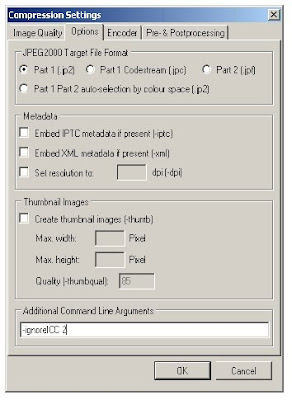

Richard Clark, as discussed in a previous blog post, presented a number of major players providing tools for converting images to JPEG 2000. Of this list, only two offer a graphical user interface (GUI); these were Photoshop and LuraWave. The other tools, such as Kakadu, Aware, Leadtools, and OpenJPEG are available as software developer kits (SDKs) or binary files and require development work in order to use them.
We tested Photoshop and LuraWave with a range of images representing material from black and white text to full-colour artworks. We attempted to set options in both products as closely as possible to the Buckley/Tanner recommendations. We tested compression levels as well, but this is the subject of a future posting.
Photoshop first began supporting JPEG 2000 with CS2. The plugin - installed separately from the CD - allows the user to view, edit and save JPEG 2000 files as jpx/jpf (extended) files (although these can be made compatible with jp2). That means that although the file is a .jpx, you can open it with programs that only work with jp2. This version provided a number of options: tile sizes, embedding metadata, and so on, but was limited. In CS3, the plugin changed. In this version, the plugin used Kakadu to encode the image, and appeared to create a "proper" jp2 file. This version got us much closer to the Buckley/Tanner recommendation. CS4 removed the plugin from the installation altogether, requiring the user to download it from the Photoshop downloads website as part of a batch of "legacy" plugins. CS5, however, now includes the plugin as part of the default install. CS5 became available this summer, so we have not had a chance to investigate this version of the plugin, but their userguide mentions JPEG 2000 in the final section and as before, saves jpx/jpf files as standard.
It is good news that Photoshop is now including the plugin as standard. However, as the previous versions of the plugin were so variable, and the implementation so non-standard, it became clear that for the time being use of Photoshop is too risky for a large-scale programme. We need flexibility in setting options, images that conform to a standard, and long-term consistency in the availability of the tool and the options it provides.
LuraWave, developed by a German company called LuraTech, provided the GUI interface we needed, so was the obvious choice for testing. We obtained a demo version and using the wide range of options available we seemed able to meet the Buckley/Tanner recommendations in their entirety. We did, however, come across two issues with this software.
Firstly, we found that with our particular settings (including multiple quality levels and resolution layers, etc.), the software created an anomaly in the form of a small grey box in certain images where a background border was entirely of a single colour (in our case, black). It was reproducible. We immediately notified the suppliers, who investigated the bug, fixed it, and sent us a new version in a matter of days. The grey boxes no longer appeared.
Secondly, when we characterised our converted images with JHOVE we found that the encoding was in fact a jpx/jpf wrapped in a jp2 format. We went back to the suppliers who informed us that our TIFFs contained an output ICC profile that was incompatible with their implementation of jp2. The tool was programmed to encode to jpx/jpf when an output ICC profile was detected. This was a bit of a blow - we use Lightroom to convert our raw images to TIFF, and Lightroom automatically embeds an ICC profile. We would either have to strip the ICC profiles from our images before conversion, or the software would need to accommodate us.
Happily, Luratech were able to re-programme the conversion tool to force jp2 encoding (ignore the ICC profile), with an option to allow it to encode to jpx/jpf if the ICC profile is detected (see screenshot of the relevent options below). We have now purchased this revised version, and will soon be integrating JPEG 2000 conversion into our digitisation workflow. Of course, all this talk of ignoring ICC profiles and so on leads us to some issues around colour space and colour space metadata in JPEG 2000. We also had an interesting experience using JHOVE, that we will talk about soon. Watch this space!
UPDATE July 2010: In order to ignore the ICC profile, an additional command has to be added to the command line, as shown in the following images:


June 25, 2010
JPEG 2000 workshop with Richard Clark
In the wake of taking on board the recommendations from the Buckley/Tanner report (see a previous blog post), we needed to start looking at how we would actually create these JPEG 2000s as part of our digitisation workflow. As the JP2K-UK group meeting showed us, there is not a lot of knowledge in our industry regarding to the tools we could use - not only for creating the JPEG 2000s in the first place, but also for managing, displaying and converting them back into other (browser-friendly, for example) formats. We knew of a few tools, but wanted a more thorough understanding of the possibilities.
We turned to software engineer Richard Clark, who was deeply involved in the JPEG Committee and has worked on the JPEG 2000 technology. Richard is based in the UK, and currently owns Elysium Ltd., offering software and IT support solutions to businesses and organisations. Richard Clark was asked to deliver a half-day workshop for those Wellcome Library staff that would be involved in implementing our JPEG 2000 solution.
The workshop focused on options for the practical implementation of JPEG 2000, and the situation regarding software support for the format. He also touched on the workflow issues we need to be aware of and address in planning our strategy. The workshop helped us determine which solution would work best for us - as will be described in subsequent posts on this blog. You can read a version of his presentation as embedded in this post. Richard also shared with us some of the more technical details from his presentation at the British Library in 2007, available on Scribd.
J2K Workshop for the Wellcome Library
We turned to software engineer Richard Clark, who was deeply involved in the JPEG Committee and has worked on the JPEG 2000 technology. Richard is based in the UK, and currently owns Elysium Ltd., offering software and IT support solutions to businesses and organisations. Richard Clark was asked to deliver a half-day workshop for those Wellcome Library staff that would be involved in implementing our JPEG 2000 solution.
The workshop focused on options for the practical implementation of JPEG 2000, and the situation regarding software support for the format. He also touched on the workflow issues we need to be aware of and address in planning our strategy. The workshop helped us determine which solution would work best for us - as will be described in subsequent posts on this blog. You can read a version of his presentation as embedded in this post. Richard also shared with us some of the more technical details from his presentation at the British Library in 2007, available on Scribd.
J2K Workshop for the Wellcome Library
June 22, 2010
Initiating the JP2K-UK Implementation Working Group
By Autumn 2009, we were committed to using the JP2 format for our digitisation projects. However, we knew that the lack of good information and communication between practitioners was a risk factor. First of all, we wanted to know what was going on so we didn't have to keep re-inventing the wheel. Has anyone else carried out compression tests on historic materials? Who uses which tools, and why? Secondly, if we could improve communications, presumably more people would feel comfortable about using JPEG 2000 serving to broaden the user base and further entrench the format into practice - essential to ensuring longevity.
This information wasn't just going to come out of the woodwork - or not as quickly as we would have liked - so we set up the "JP2K-UK Implementation Working Group", with a starting membership of one. We then cold-called a number of contacts from relevent organisations to test the level of interest in joining such a group. We optimistically booked a small meeting room, with a free lunch as an added temptation, hoping someone would be interested.
Someone was indeed interested; in fact, nearly every single person or organisation we contacted had a high level of interest in JPEG 2000, and most were actively pursuing JPEG 2000 implementation in some way as a practitioner, consultant or software developer. We booked a much bigger room, shelled out for a lot more sandwiches, and realised we needed a proper agenda. At this point we set up the JP2K-UK wiki to consolidate online resources, provide dates of any events, and list the member organisations.
Our first meeting was held in December, and we had 17 initial individual members representing 12 organisations, drawn primarily from the library world (see the wiki for member organisations). The bulk of the meeting was taken up with small groups, discussing what they knew of the different technical aspects of JPEG 2000 (formats and features, compression, IPR, and tools) where the knowledge gaps were, what the general opinion of JPEG 2000 was, and how we might act to make the use of JPEG 2000 a little bit easier for everyone.
Not surprisingly, there was a range of opinion, levels of knowledge and understanding, and intended use of the format; but every attendee was keen to work toward creating a resource for practitioners and disseminating information with a series of workshops, seminars and/or conferences. As an initial discussion the meeting set the tone for the future of the group, and further developments will be posted here very soon.
This information wasn't just going to come out of the woodwork - or not as quickly as we would have liked - so we set up the "JP2K-UK Implementation Working Group", with a starting membership of one. We then cold-called a number of contacts from relevent organisations to test the level of interest in joining such a group. We optimistically booked a small meeting room, with a free lunch as an added temptation, hoping someone would be interested.
Someone was indeed interested; in fact, nearly every single person or organisation we contacted had a high level of interest in JPEG 2000, and most were actively pursuing JPEG 2000 implementation in some way as a practitioner, consultant or software developer. We booked a much bigger room, shelled out for a lot more sandwiches, and realised we needed a proper agenda. At this point we set up the JP2K-UK wiki to consolidate online resources, provide dates of any events, and list the member organisations.
Our first meeting was held in December, and we had 17 initial individual members representing 12 organisations, drawn primarily from the library world (see the wiki for member organisations). The bulk of the meeting was taken up with small groups, discussing what they knew of the different technical aspects of JPEG 2000 (formats and features, compression, IPR, and tools) where the knowledge gaps were, what the general opinion of JPEG 2000 was, and how we might act to make the use of JPEG 2000 a little bit easier for everyone.
Not surprisingly, there was a range of opinion, levels of knowledge and understanding, and intended use of the format; but every attendee was keen to work toward creating a resource for practitioners and disseminating information with a series of workshops, seminars and/or conferences. As an initial discussion the meeting set the tone for the future of the group, and further developments will be posted here very soon.
June 18, 2010
Bringing in the experts
There are numerous articles, reviews, and technical reports on the JPEG 2000 format, many free to view online. Despite this, we found it difficult to determine how we could make best use of the format in a practical way. There are 13 "parts" to JPEG 2000 - from basic image formats to a metadata format, and even a digital cinema format. Mostly these parts are extensions to the core specification. Through our own reading, we were able to determine that Parts 1 and 2 were the ones we needed to look at. But which one to use? Part 1 specifies both a compression algorithm, and a format. Part 2 specifies a different algorithm, and extensions to the format. We could find little - short of becoming a technical expert - that would allow us to adequately weigh up the pros and cons of the various options, and even less on how others have made their decisions.
In Spring 2009 we turned to Simon Tanner, Director of Kings Digital Consultancy Services, for some advice. Simon agreed to search out the experts and provide us with a report setting out clear recommendations: primarily which format and compression to use for preservation and access, and what features we should implement. We provided him with a brief of our requirements, the background to our intended digitisation activities, and some sample images.
Simon did find an expert to work on the report: Robert Buckley, colour digital imaging expert and member of the JPEG Committee. Rob carried out a number of tests on the images we supplied looking at the implications of lossless v. lossy compression, how we might get the best out of certain JPEG 2000 features, how we should manage technical metadata, and more. This provided the evidence, set out in the report, that backed up his final recommendations.
The key recommendation was that we use the Part 1 compression and JP2 format for our digitisation projects, for both the archival master format as well as the access copy. Also important was the recommendation that we use a lossy rather than a lossless format - maintaining a high quality that could be considered "visually lossless". Although this results in a loss of information that is non-recoverable, the data that is lost was never visible to the human eye, and therefore simply unnecessary for our needs. The Wellcome Library intends to follow the recommendations as closely as possible for future digitisation projects, although exact compression levels used would need to be determined on a collection-by-collection basis with further tests.
The report is available to view on our website.


In Spring 2009 we turned to Simon Tanner, Director of Kings Digital Consultancy Services, for some advice. Simon agreed to search out the experts and provide us with a report setting out clear recommendations: primarily which format and compression to use for preservation and access, and what features we should implement. We provided him with a brief of our requirements, the background to our intended digitisation activities, and some sample images.
Simon did find an expert to work on the report: Robert Buckley, colour digital imaging expert and member of the JPEG Committee. Rob carried out a number of tests on the images we supplied looking at the implications of lossless v. lossy compression, how we might get the best out of certain JPEG 2000 features, how we should manage technical metadata, and more. This provided the evidence, set out in the report, that backed up his final recommendations.
The key recommendation was that we use the Part 1 compression and JP2 format for our digitisation projects, for both the archival master format as well as the access copy. Also important was the recommendation that we use a lossy rather than a lossless format - maintaining a high quality that could be considered "visually lossless". Although this results in a loss of information that is non-recoverable, the data that is lost was never visible to the human eye, and therefore simply unnecessary for our needs. The Wellcome Library intends to follow the recommendations as closely as possible for future digitisation projects, although exact compression levels used would need to be determined on a collection-by-collection basis with further tests.
The report is available to view on our website.
June 16, 2010
We need how much storage?
In 2009, the Wellcome Library set out an ambitious vision to digitise a large proportion of its historic collections. This would take the annual digitisation activities of the Library from hundreds, or at most, thousands of images per year to several million images per year. Collections were to include a wide range of content types - archives, printed books from the 15th to the 20th century, manuscripts, paintings and drawings, ephemera. Once we added up all these collections, using broad estimates of what we believed was there, we realised this could see the generation of up to 30m images over 5 years. Exciting, but perhaps slightly daunting, considering we didn't yet have an infrastructure to fully support such a large collection of digital assets.
Anyone reading this blog will understand why the scale of the programme is key to the blog topic. When we asked our IT department to tell us how much it would cost to store 30m TIFF files - our de facto standard for the couple hundred thousand images in our existing picture library - we were stunned. Two petabytes of online, spinning disk storage with a top-of-the-line enterprise management system and remote backup would cost how much? We learned that the cost would be something like a fifth of our total budget for the entire digitisation programme.
Should we consider a lower-cost storage solution? Even tape back-up was quite expensive for that scale, and you can't serve images up online from tape anyway. We revised our image sizes, factoring in smaller and smaller resolutions and/or bit depths for material like the printed books, which didn't need full colour, high resolution images. We still couldn't afford the storage costs.
Finally, we saw the light and started looking into a relatively new image format called JPEG 2000. We knew almost nothing about it, except that it employed an extremely efficient compression algorithm that could, possibly, allow us to reduce our storage costs without compromising too much on quality.
This was the start of our journey into the complicated and mystifying world of JPEG 2000. This blog charts our progress up to date in determining what type of JPEG 2000 we would use, how we would use it, and how it would impact on the rest of the Digital Library infrastructure. We have by no means worked out all the details around how we are going to implement JPEG 2000, so this blog will also serve as a diary of our progress as we go along. Happy reading, and feel free to post comments.
Anyone reading this blog will understand why the scale of the programme is key to the blog topic. When we asked our IT department to tell us how much it would cost to store 30m TIFF files - our de facto standard for the couple hundred thousand images in our existing picture library - we were stunned. Two petabytes of online, spinning disk storage with a top-of-the-line enterprise management system and remote backup would cost how much? We learned that the cost would be something like a fifth of our total budget for the entire digitisation programme.
Should we consider a lower-cost storage solution? Even tape back-up was quite expensive for that scale, and you can't serve images up online from tape anyway. We revised our image sizes, factoring in smaller and smaller resolutions and/or bit depths for material like the printed books, which didn't need full colour, high resolution images. We still couldn't afford the storage costs.
Finally, we saw the light and started looking into a relatively new image format called JPEG 2000. We knew almost nothing about it, except that it employed an extremely efficient compression algorithm that could, possibly, allow us to reduce our storage costs without compromising too much on quality.
This was the start of our journey into the complicated and mystifying world of JPEG 2000. This blog charts our progress up to date in determining what type of JPEG 2000 we would use, how we would use it, and how it would impact on the rest of the Digital Library infrastructure. We have by no means worked out all the details around how we are going to implement JPEG 2000, so this blog will also serve as a diary of our progress as we go along. Happy reading, and feel free to post comments.
Subscribe to:
Posts (Atom)